Hello, there is an issue with Yahoo! Messenger, when Windows starts, the Yahoo! Messenger keeps looping on the same login page screen without any result, whether it is on Yahoo! Messenger 8, or version 5.6, is there a way to fix the issue?
For more information, this is the video that demonstrates the problem caused in Yahoo! Messenger.
Can you share a screenshot of your HKEY_CURRENT_USER\Software\Yahoo\Pager registry key?
Do note that if you’re using Reroute, it requires Windows XP SP2 or newer due to the toolchain we use. You appear to be running Windows 98/2000 so you should use the registry method if you aren’t.
Hello, it seems that the Nina patcher has modified both the Windows 2000 registry on Pager, and this might go on the different machine, the Toshiba Satellite Pro L20 Laptop. Is there a way to restore them to work on CrossTalk?
In this screenshot, this is what is on the Yahoo! Messenger registry, and it might be similar on the Windows XP Professional Edition on a Toshiba Satellite Pro L20 Laptop.
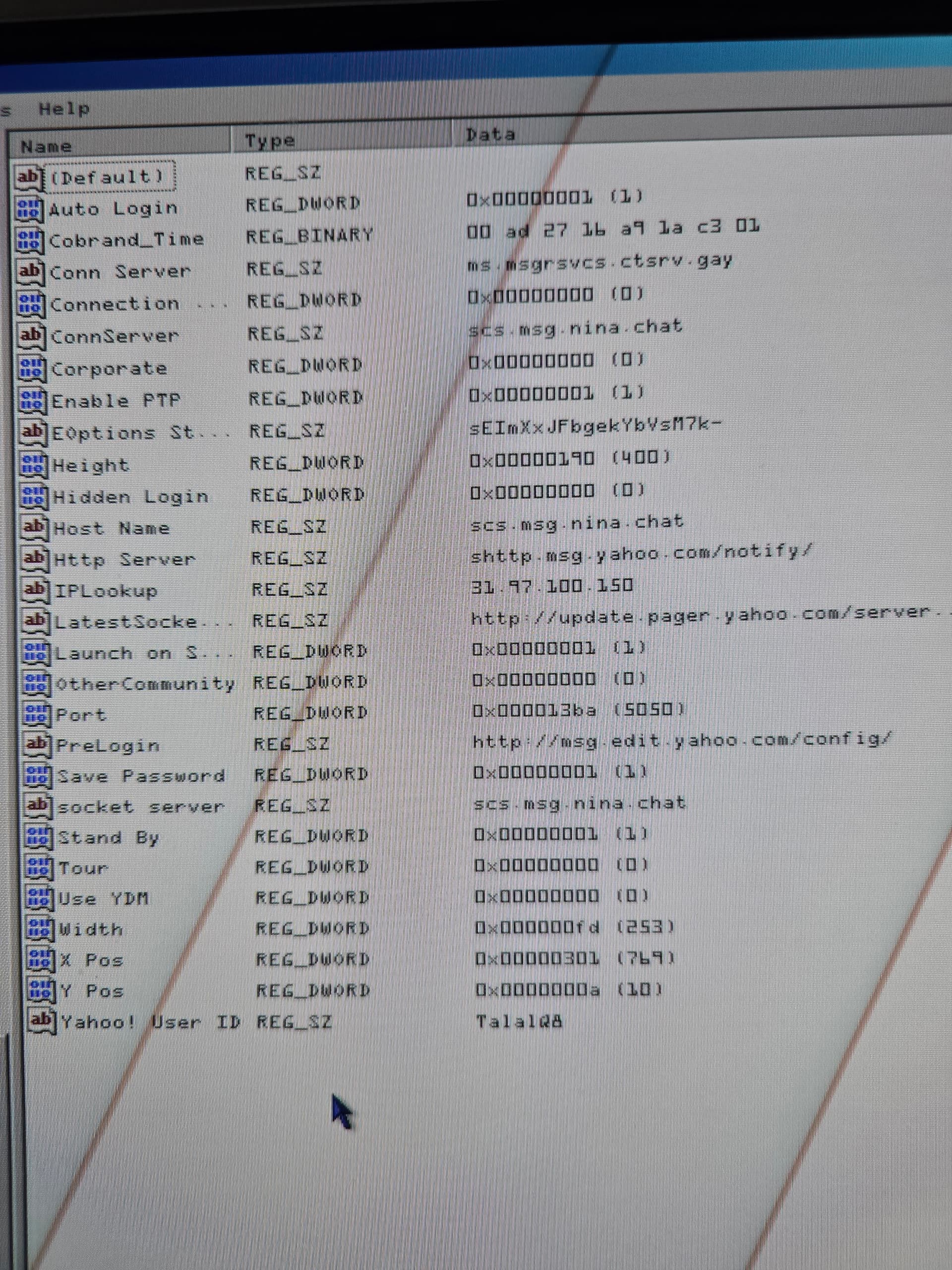
Change any NINA addresses back to ms.msgrsvcs.ctsrv.gay.
Kinda weird that happened anyway… NINA’s Yahoo! Messenger server has shut down.
Nice, it worked, thank you for the assistance.