Hey everyone  Because i’m absolutely addicted to MSN Tabs, i have made quite the collection of them, and i want to share it with everyone! :)) Hopefully this helps people like me that love tabs
  (There is also instructions on how to make the icons and where to host them because i struggled with them before)
———————————————————————————————————————————
1- eBay

2- Google (apparently custom made by some random guy in 2005)

3- KamTape (custom made by me :3)

4- LastMinute (im not sure if this is supposed to be the tab icon but this was all i could find in the archives)

5- Match(dot)com

6- Neowin

7- Rhapsody

8- Singapore Stock Exchange

9- Themes “make your own messenger”

10- Weather (custom made by me :3)
Small:

Large:

11- XBOX

—————————————————————————————————————————
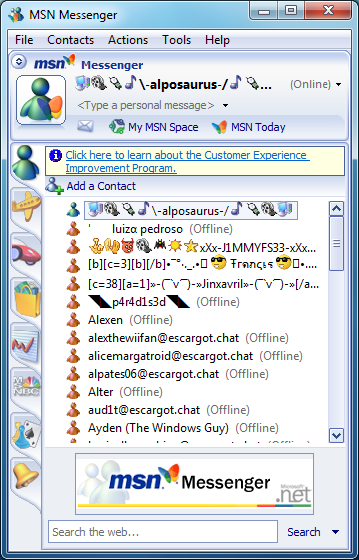
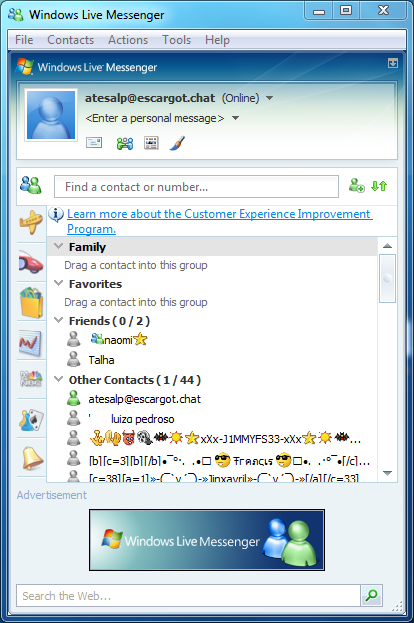
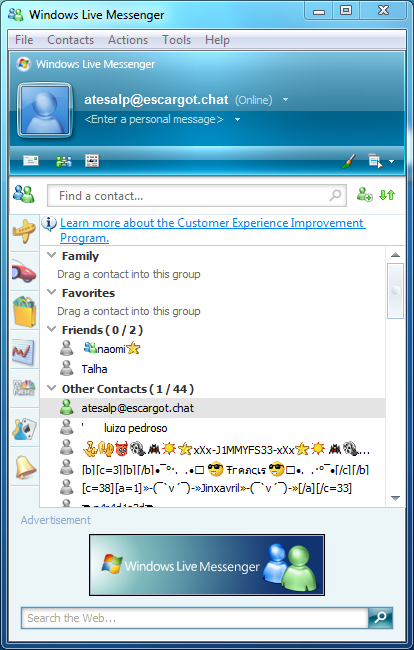
List of built-in tab icons VVVV (Tested, screenshots at the end.)
1- res:bell (used for MSN alerts)
2- res:expedia (used for expedia.com)
3- res:carpoint (used for MSN autos)
4- res:eshop (used for MSN Shopping
5- res:zone (used for Zone.com)
6- res:msnbc (used for MSNBC News)
7- res:espn (used for some kind of sports website i think)
8- res:mail (used for Hotmail)
9- res:calendar (used for calendar)
10- res:money (used for MSN Money)
Tested on Messenger 7.1, 8.1 and 8.5, screenshots below (NOTE: i tested the rest of the icons and they DO work in MSN Messenger 7.1) after i took the screenshots and i dont think taking new screenshots are worth it.
7.1:
8.1:
8.5:
—————————————————————————————————————————–
Instructions on how to make the tabs and where to host them VVVV
Many people get frustrated because whenever they make tab icons instead of the icons, a question mark appears. Well you’re in luck because i just figured out how to get rid of that question mark
In order to do this you need a canvas that is 32x36 (32x32 did not work in my case) Then you just resize your icon so it fits into the canvas and thats it! If you’re struggling to make the canvas, you can just edit one of the tab icons i listed, erase the icon, and put yours!
Now comes the easier part which is hosting it. I personally use Imgur. After you upload the icon, it will display a page with your uploads. In order to get the link of the ICON, you just click and hold on the icon, move it to a new tab, and copy the link from the adress bar! In your config server, paste the icon but make sure to replace https with http so that messenger can load it properly.
Hope this helps!